![Featured image of post [Web] Hugo+Github server](/post/1/cover_hud7e36f7e20e71be184458283bdae4646_55974_800x0_resize_q75_box.jpg)
利用Hugo建置靜態網頁放置在Github server上
結果圖

事前軟體安裝
- Git
- Hugo
開始
在Github上創立兩個Repositories 兩個Repositories分別代表
- [YourwebName] : 放置Hugo code
- [GithubUserName].github.io: 放置Hugo產生出來的靜態網頁

將兩個Repositories clone 下來並初始化hugo folder
|
|
將想要的模板git clone 到 /themes目錄下
可以去官方網站挑模板
|
|
- 注意,若要載hugo-theme-stack-starter模組要另外載mod
|
|
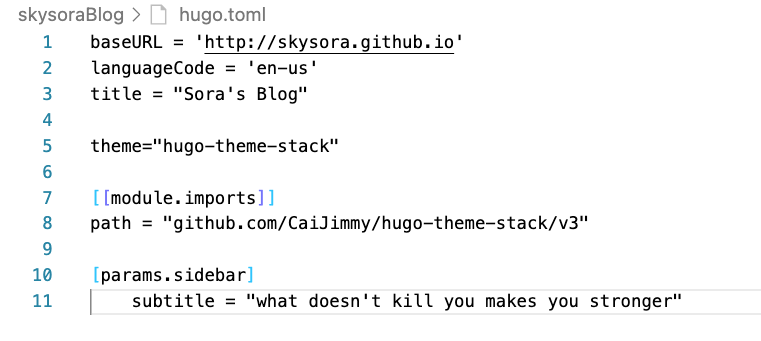
將hugo.toml 設定檔案做修正
- 修正baseURL 為你的github網址(baseURL)
- 將theme修正為你clone模板名稱(theme)
- import 模組
產生靜態網頁
- 先將[GithubUserName].github.io Repositories clone 進[yourNeedName] 資料夾
- 將hugo code 轉成靜態網頁
|
|
將靜態網頁部署上去
|
|
— Creating a Blog with Hugo and Github in 10 minutes1